MOTOROBIT — EVERYTHING FOR TECHNOLOGY LOVERS, ALL IN ONE PLACE!
MORE THAN 30,000 PRODUCTS – AN EXTENSIVE PRODUCT RANGE
YOUR PARTNER IN ELECTRONIC COMPONENT SUPPLY
EXPAND YOUR CREATIVITY BEYOND LIMITS WITH MOTOROBIT
{{ t.categories }} ({{ live_data.categories.length }})
{{ t.brands }} ({{ live_data.brands.length }})
{{ t.products }} ({{ live_data.products.length }})
{{ t.see_all }}
Menu
If you cannot find a specific electronic or automation spare part on our website or in the market, please contact us — quantity does not matter!If you cannot find a specific electronic or automation spare part on our website or in the market, please contact us — quantity does not matter!If you cannot find a specific electronic or automation spare part on our website or in the market, please contact us — quantity does not matter!If you cannot find a specific electronic or automation spare part on our website or in the market, please contact us — quantity does not matter!If you cannot find a specific electronic or automation spare part on our website or in the market, please contact us — quantity does not matter!If you cannot find a specific electronic or automation spare part on our website or in the market, please contact us — quantity does not matter!If you cannot find a specific electronic or automation spare part on our website or in the market, please contact us — quantity does not matter!If you cannot find a specific electronic or automation spare part on our website or in the market, please contact us — quantity does not matter!If you cannot find a specific electronic or automation spare part on our website or in the market, please contact us — quantity does not matter!If you cannot find a specific electronic or automation spare part on our website or in the market, please contact us — quantity does not matter!If you cannot find a specific electronic or automation spare part on our website or in the market, please contact us — quantity does not matter!If you cannot find a specific electronic or automation spare part on our website or in the market, please contact us — quantity does not matter!
Arduino Sequential LED Blinking Project
Publish Time: 26.07.2023
Reading Time: 2 Minute
Arduino Sequential LED Blinking Project

Arduino Sequential LED Blinking Project


This LED lighting project, which can be easily done by beginners using Arduino, is one of the first things that comes to mind when it comes to simple Arduino projects. In our blog post, you can find the necessary materials, connection diagram, and required software to make this project.


Required Materials

· Arduino Uno R3

· Breadboard

· 5 LEDs

· 5 220ohm Resistors

· Male - Male Jumper Cable or 65-piece Male - Male Jumper Set


You can purchase all the necessary materials for Arduino Uno with Led Burning and extinguishing by clicking on the product names.


Project Connection Diagram
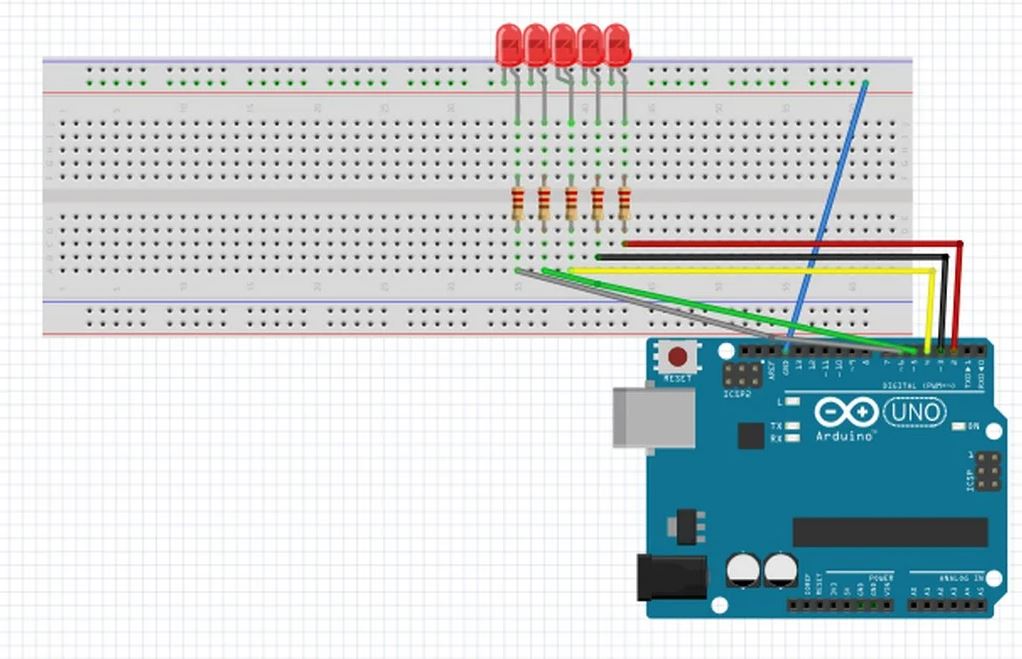
 

Black Lightning Connection Diagram


After making the necessary connections, you can upload the following code to your Arduino.


Project Codes


1

2

3

4

5

6

7

8

9

10

11

12

13

14

15

16

17

18

19

20

21

22

23

24

25

26

27

28

29

30

31

32

33

34

// Sequentially blinking LEDs (Black Lightning)

int aled = 3; // Define pin 3 as aled.

int bled = 4; // Define pin 4 as bled.

int cled = 5; // Define pin 5 as cled.

int dled = 6; // Define pin 6 as dled.

int eled = 7; // Define pin 7 as eled.

void setup() {

pinMode (aled, OUTPUT); // Define pin 8 as output.

pinMode (bled, OUTPUT); // Define pin 9 as output.

pinMode (cled, OUTPUT); // Define pin 10 as output.

pinMode (dled, OUTPUT); // Define pin 11 as output.

pinMode (eled, OUTPUT); // Define pin 12 as output.

}

void loop() {

digitalWrite (aled, HIGH); // Turn on aled.

delay (100); // Keep it on for 0.1s

digitalWrite (aled, LOW); // Turn off aled.

delay (100); // Keep it off for 0.1s

digitalWrite (bled, HIGH); // Turn on bled.

delay (100); // Keep it on for 0.1s

digitalWrite (bled, LOW); // Turn off bled.

delay (100); // Keep it off for 0.1s

digitalWrite (cled, HIGH); // Turn on cled.

delay (100); // Keep it on for 0.1s

digitalWrite (cled, LOW); // Turn off cled.

delay (100); // Keep it off for 0.1s

digitalWrite (dled, HIGH); // Turn on dled.

delay (100); // Keep it on for 0.1s

digitalWrite (dled, LOW); // Turn off dled.

delay (100); // Keep it off for 0.1s

digitalWrite (eled, HIGH); // Turn on eled.

delay (100); // Keep it on for 0.1s

digitalWrite (eled, LOW); // Turn off eled.

}


Share
T-Soft | Premium